
Uncategorized
How to Choose the Right Label Printers for Your Business
Oct
Why the Right Label Printers Matter for Your Business
Label printers serve numerous functions. Often, they help consumers locate a product, track and manage a company’s inventory, and assist businesses in adhering to shipping and safety regulations. When using a label to provide vital information, a blurry label can lead to adverse consequences, especially in an industry that has stringent regulations.
What Can Go Wrong With the Wrong Printer?
There are many negative consequences associated with the wrong label printer. Often, the wrong printer leads to wasted time due to a slow print speed, or many jams. Costly and inflexible label supplies can prove to be a major inconvenience. There are many ways a good label printer can positively impact and integrate into a business.
Planning Ahead
With proper planning, a label printer can positively impact a business and assist in business growth. Often, an expansion causes a company to outgrow its label printer. Understanding where the business is going can assist in minimizing the negative consequences associated with unexpected and unplanned business growth.
Knowing Your Needs
It is important that a company understands its needs and requirements before deciding on a label printer. Oftentimes, the price of the label printer is the first and foremost consideration for a customer. Understanding your needs can alleviate the stress associated with making the other important decisions regarding your business.
Match the Printer to Your Volume
The choices you make throughout will be impacted by your actual numbers. Honesty is important, but think about the needs of your business in the next 2-3 years and select the options that are the most future-proof. A small shop that prints 20 labels a day will need different hardware than a large warehouse that prints 2000 a day.
The Different Types of Label Printers
There are a few options on the market. Each type has certain characteristics that make them suited (or unsuited) to certain types of label printing. Let’s take a look at the main options.
Direct Thermal Printers
These printers use heat to “burn” away the coating on special paper to create a label. These printers are low cost and very easy to use. They work well for receipts and shipping labels. One downside is that the print can fade over time. These types of label printers are not good for long-term labels.
Thermal Transfer Printers
Thermal Transfer printers use heat to fuse a ribbon to the label. These printers are good for product and asset labels. These labels can withstand water and chemical solvents and also resistant to rubbing. The downside is that they are more expensive, because the ribbon costs are passed on to the consumer.
Inkjet and Laser Printers
These printers are good for full color labels. A downside is that colored ink is expensive, so consider the long term cost of the printer and ribbon.
Portable and Handheld Printers
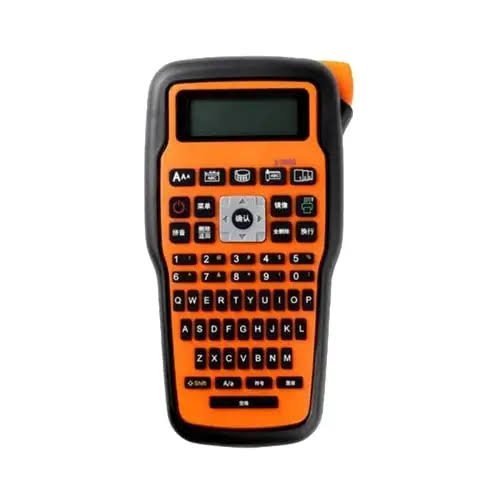
These compact printers are designed for use away from a conventional power or networking setup. Many have a rechargeable battery and can be easily held or carried. Due to their limitations, these printers are best for short, infrequent printing jobs, such as delivery route printing or ticketing.
Key Features To Look For
Knowing the type of printer you want, consider the key features below. These will have the biggest effect on your day-to-day use.
Print Speed
Speed can be measured in several ways. However, when choosing a label printer, the most important factor is how many inches it prints per minute (IPM). For example, fast printers can help shipping desks process orders more efficiently. On the other hand, slower models can work well for printing tickets or receipts in retail environments.
Print Quality
Images can be made up of millions of tiny dots. The more dots per inch (DPI) the better. Many shipping label and small barcode printers offer 203 DPI. However, if you want to print higher-quality tickets or receipts, you’ll need a printer with 300 DPI or higher.
Connectivity
Most printers can be connected via USB. More networking options, such as Wi-Fi, Bluetooth, or Ethernet are great for allowing multiple users to access the printer at the same time.
Label Width
Not all printers can handle large label rolls. Make sure to find one that can take the widest label you’d need to print.
Software
Printers that integrate well with other applications you use can greatly increase the ease of use. Designing tickets or receipts can be a hassle without an integrated printer, so choose one that comes with design software to make the process easier.
Cost Comparison: Printer, Labels and Supplies
Printer costs are made up of many costs beyond just the printer. These costs include labels, ribbons and ink and repairs. Over the course of a year, the costs can really add up. You may find that a more expensive printer actually costs less in the long run.
Keep an Eye on Label Costs
Labels can cost you the most over your printer’s lifetime. Some companies lock you in and only let you use their labels. Other printers allow you to use any label you want. Be sure to take into account the cost of labels when deciding on a printer.
Consider Warranty and Support
Make sure to check the warranty. A longer warranty means you have piece of mind. Good support means they respond and resolve support issues quickly.
Best Label Printers for Different Businesses
Every business is different, so the best choice changes. Here is a simple guide to match your business with the right type. Use it as a starting point, then test a few models.
Online Sellers and Small Shops
A direct thermal printer is usually enough. It prints shipping labels fast and costs little to run. You never need to buy ink.
Warehouses and Factories
Choose a thermal transfer printer. It handles heavy use and prints tough barcodes. Look for a strong, industrial model with fast speed.
Food and Drink Brands
A color inkjet or laser printer shines here. It makes eye-catching labels for jars, bottles, and boxes. Make sure the labels suit cold or damp places.
Mobile and Field Teams
A portable printer is the best fit. It prints on the spot and fits in a bag. Pick one with a long battery life.
Offices and Clinics
Look for a compact model with Wi-Fi. It should print names, files, and mail labels with ease. Quiet and simple models work best here.
Common Mistakes to Avoid
Many buyers make the same errors. Knowing them can save you money. Avoid these traps when you shop.
Three Errors That Cost Money
First, do not buy on price alone. A low price can hide high running costs. Second, do not ignore label size. A printer that cannot handle your labels is useless. Third, do not skip the software check. Poor software can make a great printer hard to use.
Plan Ahead and Test First
Also, do not forget the future. If your orders double, will your printer keep up? Finally, always test before you commit. Many sellers offer demos or return periods. Use them to see the print quality yourself.
Final Thoughts on Choosing Label Printers
Picking the right printer does not need to be hard. Start with your needs. Learn the main types. Compare the key features and the true costs. Hence, always match the printer to your business and your budget.
